
Google reviews are one of the most important ranking signals in Google Maps and local SEO. When people search for a dentist, they usually compare star ratings, number of reviews, and recent patient experiences. Clinics with many positive reviews often receive more clicks, more calls, and more new patients.
Reviews also help your clinic appear in Google Maps results and AI search answers when people look for local dentists. The problem is simple. Most patients are happy with their treatment, but very few remember to leave a review unless you ask.
The solution is creating a simple and consistent system to request Google reviews.
Why Google Reviews Matter for Dentists
Google reviews influence both Google Maps rankings and patient decisions. When people search for a dentist, reviews are often the first thing they evaluate before clicking a clinic.
They help both Google and potential patients understand the quality and popularity of your practice.
Key reasons Google reviews matter:
- Consumers read reviews before choosing a business. Around 83% of people use Google to find local business reviews.
- Reviews strongly influence decisions. About 74% of consumers check at least two review platforms before choosing a local business.
- Recent reviews matter more. Roughly 48% of consumers only trust reviews written within the last two weeks.
- A higher number of reviews builds trust. Many users expect businesses to have dozens or even hundreds of reviews before they feel confident booking.
- Star ratings affect clicks. Businesses with 4+ star ratings receive significantly more clicks from search results.
- Reviews improve local SEO signals. Google uses review quantity, rating, and freshness as ranking signals for Google Maps.
- Reviews influence AI search results. AI assistants and search summaries often highlight businesses with strong review profiles when recommending local services.
For dental clinics, reviews act as social proof that your treatments and patient experience are reliable.
When Is the Best Time to Ask Patients for Reviews?
Timing has a major impact on whether a patient actually leaves a review. The best moment is when the patient already feels satisfied with their visit.
The most effective moments include:
- Right after a successful treatment. The patient feels relief or satisfaction from the result.
- After a hygiene or cleaning appointment. These visits usually have positive outcomes and low stress.
- When the patient compliments the dentist or staff. This is a natural moment to ask for feedback.
- During checkout at reception. The patient has completed the visit and interaction with the clinic.
- Shortly after the appointment through SMS. Sending a review link within a few hours keeps the visit fresh in their memory.
Moments to avoid include:
- Before treatment results are clear. The patient may still feel uncertain.
- When the patient is in pain or stressed. Reviews requested at the wrong moment can feel insensitive.
- During complaints or scheduling problems. These situations reduce the chance of positive feedback.
Asking at the right time makes the process feel natural and significantly increases the chances that patients will actually leave a review.
The Simplest Way to Ask for a Google Review
Many clinics overcomplicate the process. The simplest method is often the most effective.
A staff member can say something like:
“If you had a good experience today, it would really help us if you left a Google review.”
The request should be short, honest, and easy to understand. The key is making the process very quick for the patient.
This is where a Google review link and QR code become essential.
How to Send a Google Review Link
A Google review link opens the review window for your clinic directly. This removes friction because the patient does not need to search for your clinic on Google.
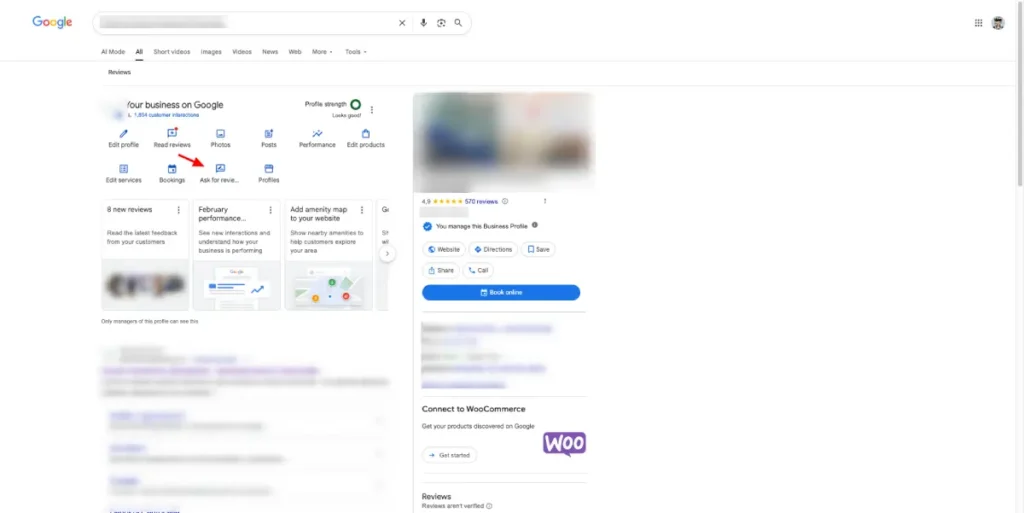
Step 1: Open your Google Business Profile
Search your clinic name on Google while logged into the account that manages the profile.
You will see the Google Business Profile management panel directly in search results.
Step 2: Click “Ask for reviews”
Inside the management panel, find the Ask for reviews option.
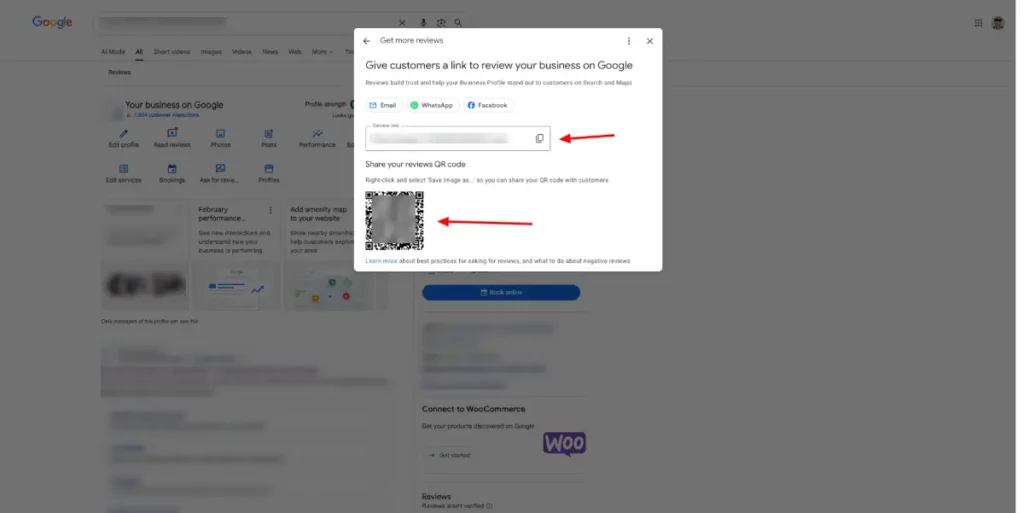
Google will open a popup containing your direct review link.
Step 3: Copy and save the link
Copy the link and save it in places where your team can easily use it, such as:
- CRM templates
- SMS templates
- WhatsApp quick replies
- email templates
- internal SOPs
Step 4: Test the link
Open the link on your phone and computer to confirm it goes directly to the review window.
If the link works smoothly, patients are far more likely to complete the review.
How to Get the Google Review QR Code
Google Business Profile now generates a QR code automatically together with the review link.
Step 1: Open the “Ask for reviews” window
Follow the same steps used to generate the review link.
Inside the popup you will see both:
- the review link
- the QR code
Step 2: Download the QR code
Download the QR code image provided by Google.
Step 3: Print and place the QR code
Place the QR code in locations where patients naturally pause, such as:
- reception desk
- checkout counter
- waiting room posters
- appointment cards
Add a short message next to it such as:
- Scan to leave a Google review
- Happy with your visit? Scan here
- Your feedback helps other patients find us
Step 4: Test the QR code
Scan the code with your phone to confirm it opens the correct review page.
Best Ways to Deliver the Review Request
Once your review link and QR code are ready, the next step is delivering the request effectively.
The following methods are ordered from most effective to least effective.
- In person. Asking directly at reception after a successful visit usually produces the highest response rate.
- SMS. Text messages are opened quickly and the review link is easy to click.
- WhatsApp. Very effective if your clinic already communicates with patients through WhatsApp.
- Email. Still useful but typically less immediate than SMS or messaging apps.
The strongest approach is often asking in person and then sending the link through SMS or WhatsApp shortly afterward.
Clever Ways to Get More Google Reviews
A simple request works well, but a structured system can dramatically increase review volume.
Offer a small thank-you when allowed
Some clinics offer small appreciation gestures for patient feedback.
Examples include:
- free dental hygiene kits
- small branded gifts
- toothbrush or floss packs
- seasonal giveaways
These gestures should never require a positive review. Always ask for honest feedback.
Reward staff for asking consistently
Sometimes the main barrier is simply that staff forget to ask.
Clinics can motivate their team with internal incentives such as:
- monthly bonuses tied to review request activity
- team rewards when review targets are reached
- internal scorecards tracking review requests
The goal is building a consistent habit of asking patients.
Automate review requests from your CRM
Many dental clinics automate review requests through their CRM or practice management software.
A typical automation flow might look like this:
- Appointment status changes to Completed in the CRM.
- A filter checks whether the appointment type qualifies for review requests (for example hygiene or completed treatments).
- The CRM waits 1–3 hours after the visit.
- The patient automatically receives an SMS, WhatsApp message, or email containing the review link.
Automation can include filters such as:
- appointment type
- treatment completed
- no open complaints
- patient contact preferences
This avoids sending review requests after stressful visits or unresolved issues.
Use sequences instead of single messages
Some clinics use simple follow-up sequences.
Example automation sequence:
- Step 1: SMS sent a few hours after the visit thanking the patient and including the review link.
- Step 2: If no review is left within 48 hours, send a short reminder message.
- Step 3: If still no response, stop the sequence to avoid annoying the patient.
Short sequences often outperform a single request.
Use a feedback form before sending patients to Google
A more advanced approach is collecting feedback first.
The process can work like this:
- Send patients a short feedback form after the visit.
- Ask them to rate their experience from 1 to 5 stars.
- If the rating is very positive, show a button linking to your Google review page.
- If the rating is negative, redirect them to a private contact form instead.
This allows the clinic to resolve problems privately while encouraging happy patients to leave public reviews.
Do not buy Google reviews online
Buying fake reviews is risky and can damage both credibility and search visibility.
Fake reviews can:
- violate Google policies
- be removed later
- create suspicious patterns
- reduce patient trust
Real reviews from real patients are always more valuable for long-term SEO and reputation.
How Many Google Reviews Does a Dentist Need?
There is no exact number because competition varies by location.
However, dentists ranking in top Google Maps positions often have:
- 50+ reviews in small towns
- 150+ reviews in medium cities
- 300+ reviews in competitive metropolitan areas
Consistency matters more than sudden spikes in reviews. A steady flow of new feedback signals that the clinic is active and trusted.
Example: How Reviews Helped a Dental Clinic Grow
One of my clients, a dental clinic, started with no online visibility and relied mostly on word of mouth.
After implementing a structured local SEO strategy, including Google Business Profile optimization and a system to consistently ask patients for reviews, the clinic grew from 13 new patients per month to over 120 per month.
Today the clinic has more than 500 Google reviews. While reviews are not the only factor behind the growth, they play a major role in building trust and helping the clinic consistently attract new patients through Google Maps and local search.
Common Mistakes Dentists Make With Google Reviews
Many clinics unintentionally limit the number of reviews they receive.
Common mistakes include:
- Not asking patients directly. Many satisfied patients simply forget to leave a review.
- Making the process complicated. Patients should never need to search for the clinic manually.
- Requesting reviews only occasionally. Consistency produces better results over time.
- Ignoring reviews. Responding to reviews shows that the clinic values patient feedback.
Final Thoughts
Google reviews are one of the most powerful tools for local visibility.
For dental clinics, they influence Google Maps rankings, patient trust, and appointment decisions.
The most successful clinics do not rely on random reviews. They build simple systems to request reviews consistently.
A combination of review links, QR codes, SMS follow-ups, and automated CRM requests can steadily increase reviews over time.
As your review count grows, so does your clinic’s visibility and credibility online.
My Case Study: 13 to 81 New Patients per Month
This clinic was nearly invisible online — averaging 13 new patients per month.
By fixing website structure, optimizing Google Business Profile, and applying consistent weekly SEO, growth became steady and predictable.
Within months, they reached 81 new patients per month, roughly tripling revenue.
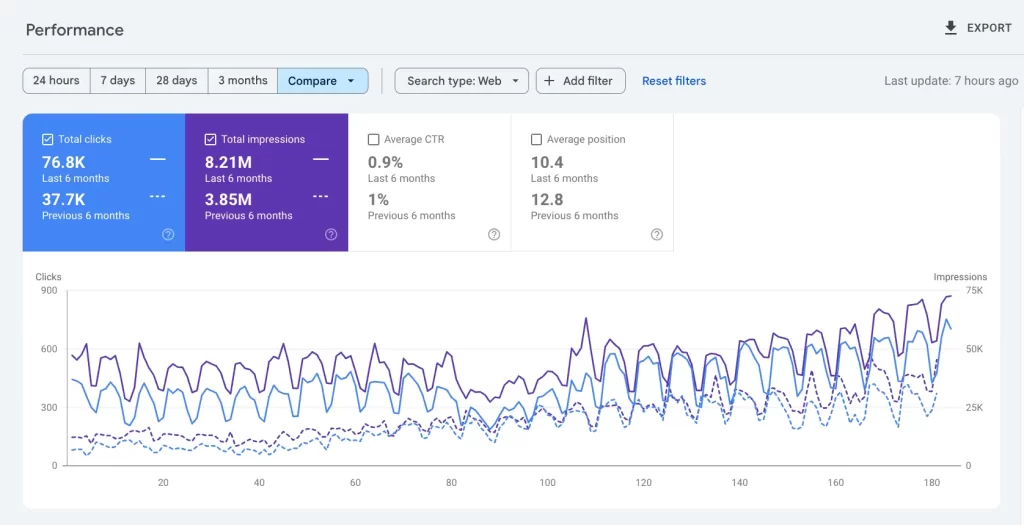
Search Console shows the compounding effect:
37.7K clicks → 76.8K clicks in 6 months
No hacks. Just structured dental SEO done consistently — and built to convert.

FAQs About How to Ask Patients for Google Reviews
How do dentists ask patients for Google reviews?
Dentists can ask patients directly after a positive visit and provide a review link through SMS, WhatsApp, email, or a QR code in the clinic.
Can dentists ask patients for reviews?
Yes. Dentists can request honest feedback from patients as long as they do not require positive reviews or violate professional or platform guidelines.
What is the easiest way to get Google reviews?
The easiest method is asking patients in person and sending a direct review link through SMS immediately after their appointment.
Do Google reviews help dentists rank higher?
Yes. Reviews influence Google Maps rankings and local search visibility while increasing patient trust.
Articles related to How to Ask Patients for Google Reviews
- Dental Website SEO
- Google Business Profile for dentists
- Dental SEO
- Google Ads for Dentists
- Local SEO for Dentists
- Social Media for Dentists
- Word of Mouth for Dentists
- What Is Local SEO and How Does It Work? (Simple Guide for 2026)
- Local SEO for Small Businesses in 2026
- Will This Hurt My SEO? 21 Common Mistakes to Avoid
- SEO Services | Get More Traffic & Customers
- Google Business Profile 1-Day Masterclass