

Google Business Profile for Dentists:
How to Set Up and Optimize It
What do you want from this article?
Table of Contents
How to Set Up a Google Business Profile for Dentists
Setting up a Google Business Profile for dentists allows your clinic to appear when people search for dental services nearby.
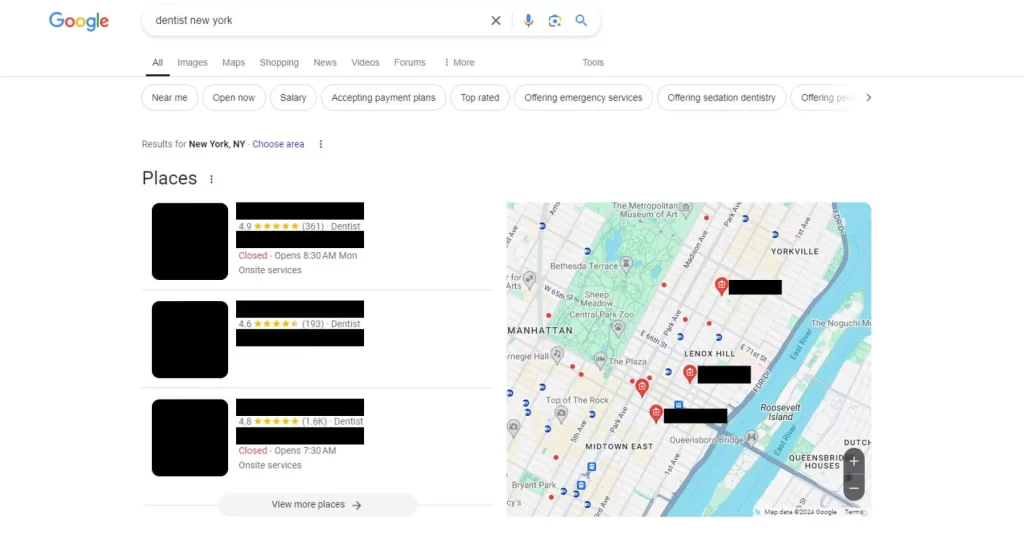
When someone types queries like “dentist near me,” “emergency dentist,” or “dental implants in [city],” Google often shows a map with nearby clinics before normal websites.
A properly configured profile helps potential patients quickly see your location, opening hours, reviews, photos, and contact information.
For many dental practices, this listing becomes one of the main sources of new patient inquiries.
Setting it up correctly from the beginning helps Google understand your services, connect your clinic with local searches, and increases the chances of appearing in the Google Map Pack.
Example: one clinic improved visibility and grew from 13 to 81 new patients per month using local SEO and Google Business Profile optimization.
Create your Google Business Profile
Creating a Google Business Profile for dentists is one of the fastest ways to appear when people search for a dentist nearby. When someone types “dentist near me” or “emergency dentist in [city],” Google often shows a map with local clinics first.
To create your profile, go to Google Business Profile and add your dental practice. The process only takes a few minutes, but accuracy is important because this information will appear directly in Google search results.
Steps to create your profile:
- Sign in with a Google account used for your clinic
- Search for your clinic to avoid duplicate listings
- Click “Add your business to Google”
- Enter your dental clinic name
- Select your business category
- Add location and contact information
- Submit the profile for verification
A correctly created profile is the foundation for ranking in local dental searches.
Choose the right category for your dental practice
Selecting the correct category helps Google understand what your clinic does and when to show it in search results. For a Google Business Profile for dentists, the main category should usually be “Dentist.”
You can also add additional categories if your clinic offers specialized treatments. These help Google connect your practice with more specific searches such as dental implants or orthodontics.
| Main Category | When to Use |
|---|---|
| Dentist | General dental clinics |
| Cosmetic Dentist | Smile design, veneers, whitening |
| Orthodontist | Braces or Invisalign specialists |
| Pediatric Dentist | Clinics focused on children |
| Dental Implants Provider | Implant-focused practices |
Choose the most accurate main category first. Secondary categories should reflect real treatments offered in your clinic.
Add address, phone, and business hours
Your contact information must be consistent everywhere online. Google uses this information to verify your business and connect your profile with your website and local citations.
For a Google Business Profile for dentists, always use the exact same format for your name, address, and phone number as on your website and other directories. Even small differences can reduce trust signals.
Important details to include:
- Full clinic address with street and number
- Local phone number used for patient appointments
- Business hours for each day of the week
- Special hours for holidays or closures
- Website link to your dental clinic homepage
- Appointment link if online booking is available
Accurate contact information helps patients reach your clinic quickly and improves local ranking signals.
Verify your dental practice
Verification confirms to Google that your dental clinic is real and located where you claim it is. Until the profile is verified, it will not fully appear in local search results.
Most dental clinics verify their Google Business Profile for dentists through a postcard sent by Google. The postcard contains a code that you must enter in your profile to confirm ownership.
Typical verification methods include:
- Postcard verification sent to your clinic address
- Phone verification in some cases
- Email verification for certain businesses
- Video verification requested by Google
- Instant verification if connected to Search Console
Verification usually takes a few days. Once completed, your clinic becomes eligible to appear in Google Maps and the local Map Pack.
Add services, treatments, and a business description
Your profile should clearly explain what your dental clinic offers. Google uses this information to understand which searches your clinic is relevant for.
When writing the description in your Google Business Profile for dentists, explain your main treatments, your approach to patients, and what makes your clinic different.
Examples of services to include:
- Dental implants
- Teeth whitening
- Invisalign or orthodontics
- Emergency dental care
- Pediatric dentistry
- Dental hygiene and cleanings
Your description should be clear and natural, not stuffed with keywords. Focus on explaining how your clinic helps patients and what treatments they can expect.
Upload photos of your dental clinic
Photos build trust before a patient even visits your clinic. A Google Business Profile for dentists with real photos often receives more clicks than one with generic images.
Good photos also help patients feel more comfortable by showing the environment and the people they will meet.
Useful types of photos include:
- Exterior of the dental clinic building
- Reception area and waiting room
- Treatment rooms and equipment
- Dentist and staff portraits
- Before and after treatment examples
- Clinic logo and branding images
High-quality photos improve engagement and can influence whether someone chooses your clinic over a competitor.
How to Optimize Your Google Business Profile for Dentists
How dentists rank in the Google Map Pack
When someone searches for a dentist, Google usually shows three clinics in the Map Pack. Ranking there depends on several factors connected to your Google Business Profile for dentists.
Google evaluates three main signals:
| Ranking Factor | What It Means |
|---|---|
| Relevance | How well your profile matches the search |
| Distance | How close your clinic is to the user |
| Prominence | Reputation, reviews, and online presence |
Dentists can improve prominence by collecting reviews, updating their profile regularly, and having a well-optimized website connected to the profile.
A strong Google Business Profile combined with local SEO content on your website greatly increases the chances of appearing in the Map Pack.
Using local keywords in your profile
Local keywords help Google connect your dental clinic with searches in your city. These should appear naturally in your Google Business Profile for dentists, especially in your business description and services.
Examples of local keywords dentists often use:
- Dentist in [city name]
- Emergency dentist in [city]
- Dental implants in [city]
- Invisalign dentist in [city]
- Family dentist near [neighborhood]
Use them naturally when describing treatments or services. Avoid repeating the same keyword excessively because Google may treat it as spam.
Local keywords work best when your profile, website pages, and patient reviews all reference the same treatments and location.
Getting more patient reviews
Reviews are one of the strongest ranking and trust signals for a Google Business Profile for dentists. Clinics with many positive reviews often appear higher in the Map Pack and receive more clicks.
Simple ways dentists collect reviews include:
- Asking patients after successful treatments
- Sending a review link by email or SMS
- Placing a QR code at the reception desk
- Including the review link in follow-up messages
- Training staff to remind happy patients
Consistent review collection works better than asking once in a while. Even a few new reviews every month can significantly improve your profile’s visibility.
Responding to Google reviews professionally
Responding to reviews shows both Google and potential patients that your clinic cares about feedback. A Google Business Profile for dentists that actively replies to reviews usually builds more trust.
Best practices when replying to reviews:
- Thank patients for positive feedback
- Mention the treatment or experience if appropriate
- Keep responses short and professional
- Avoid discussing private medical details
- Address negative reviews calmly and respectfully
Even negative reviews can become opportunities to show professionalism. A polite response often reassures potential patients who read the interaction later.
Posting updates with Google Posts
Google Posts allow dentists to publish updates directly inside their profile. These posts appear in the business listing and can highlight promotions, announcements, or educational content.
Common types of posts used in a Google Business Profile for dentists include:
- Announcements about new treatments
- Promotions for teeth whitening or cleanings
- Educational dental tips
- Holiday opening hours
- New equipment or technology in the clinic
Posting regularly signals activity to Google and keeps your profile fresh. It also gives potential patients useful information before they contact your clinic.
Uploading 100+ photos and videos regularly
Regularly updating photos keeps your Google Business Profile for dentists active and engaging. Google often rewards profiles that consistently add fresh visual content.
Useful updates dentists can post include:
- New clinic renovations
- Updated equipment or technology
- Staff introductions
- Educational videos explaining treatments
- Short clips showing the clinic environment
Even simple smartphone photos can help if they are clear and well lit. Regular updates also reassure patients that the clinic is active and professional.
Tracking performance with Google Business Profile Insights
Google Business Profile Insights shows how patients discover and interact with your clinic listing. This data helps dentists understand what is working and what can be improved.
Important metrics to monitor include:
| Metric | What It Shows |
|---|---|
| Searches | How people found your clinic |
| Views | How often your profile appears |
| Calls | Phone calls from the listing |
| Website clicks | Visits to your dental website |
| Direction requests | Patients navigating to your clinic |
Tracking these numbers helps identify trends, such as which treatments attract the most searches or which months bring the most patient inquiries.
Common Google Business Profile mistakes dentists should avoid
Many dentists create a profile but never fully optimize it. These mistakes can prevent a Google Business Profile for dentists from ranking well.
Common problems include:
- Choosing the wrong business category
- Not verifying the profile
- Incomplete services and descriptions
- Few or no patient reviews
- Outdated clinic hours
- No photos of the clinic
- Ignoring questions or reviews
Fixing these issues can significantly improve visibility. Often the difference between ranking and not ranking is simply completing and maintaining the profile properly.
How to Hire Someone to Manage Your Google Business Profile
When dentists should hire a Google Business Profile specialist
Managing a Google Business Profile for dentists can be simple at first, but it becomes more complex when competition increases. Dentists often consider hiring a specialist when they want stronger visibility or when they lack time to manage the profile.
Situations where hiring help makes sense include:
- Competing clinics dominate the Google Map Pack
- The clinic receives few calls from Google searches
- Reviews are not being collected regularly
- The profile has outdated information
- The clinic wants to grow patient acquisition online
A specialist can optimize the profile, manage reviews, and connect it with a broader local SEO strategy.
For example, one dental clinic I worked with grew from about 13 to over 80 new patients per month after improving the website, optimizing the Google Business Profile, and applying consistent SEO.
You can read the full case study to see how it was done.
What a Google Business Profile manager actually does
A Google Business Profile manager focuses on improving visibility, trust, and engagement for your dental clinic listing. Typical tasks include:
- Optimizing categories and services
- Writing and updating the business description
- Uploading photos and posts regularly
- Managing patient reviews and responses
- Monitoring profile performance and insights
- Fixing duplicate or incorrect listings
Many specialists also connect the Google Business Profile for dentists with website SEO and local citations to strengthen ranking signals.
Cost of Google Business Profile management for dentists
The cost of managing a Google Business Profile for dentists varies depending on the level of service provided. Some dentists only need occasional optimization, while others require ongoing management.
| Service Type | Typical Cost Range |
|---|---|
| One-time profile optimization | $200 – $900 |
| Monthly management | $200 – $900 per month |
| Full local SEO service | $900 – $2,000+ per month |
Prices depend on the competitiveness of the area and how much work is required. In competitive cities, ongoing optimization is usually necessary.
DIY vs hiring a dental marketing expert
Some dentists prefer managing their Google Business Profile for dentists themselves, while others prefer hiring a professional. Both options have advantages depending on time, budget, and expertise.
| DIY Management | Hiring an Expert |
|---|---|
| Lower cost | Faster results |
| Full control of updates | Professional optimization |
| Requires learning and time | Saves time for the dentist |
| Risk of mistakes | Strategic local SEO approach |
Many dentists start by managing the profile themselves and later hire a specialist once the clinic grows and competition becomes stronger.
My Case Study: 13 to 81 New Patients per Month
This clinic was nearly invisible online — averaging 13 new patients per month.
By fixing website structure, optimizing Google Business Profile, and applying consistent weekly SEO, growth became steady and predictable.
Within months, they reached 81 new patients per month, roughly tripling revenue.
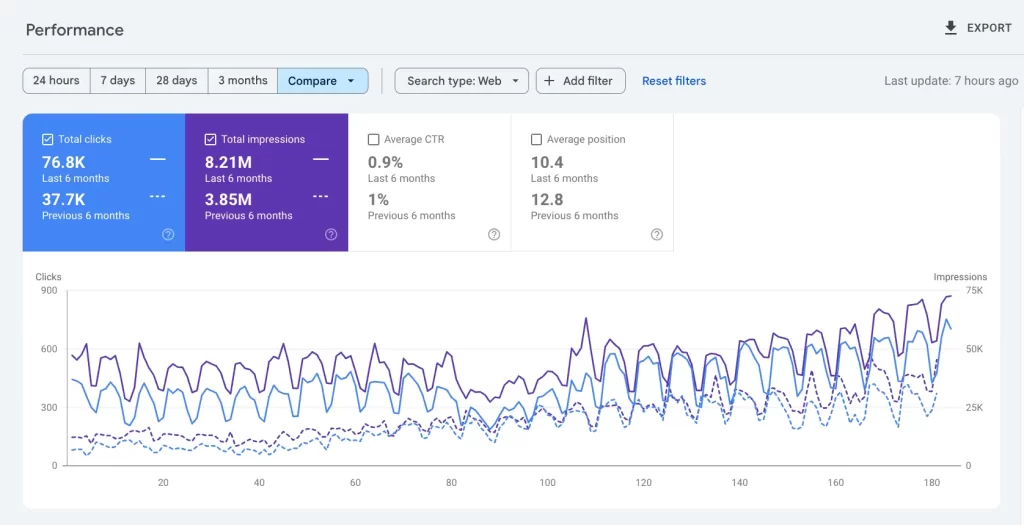
Search Console shows the compounding effect:
37.7K clicks → 76.8K clicks in 6 months
No hacks. Just structured dental SEO done consistently — and built to convert.

FAQs About Google Business Profile for Dentists
Is Google Business Profile free for dentists?
Yes. Creating a Google Business Profile for dentists is completely free. Google allows dental clinics to create a listing, appear in Google Maps, collect reviews, and display important business information without paying.
However, while the profile itself is free, many clinics invest in optimization or local SEO to improve their visibility in competitive areas.
How long does it take for a dental clinic to appear on Google Maps?
After creating and verifying your Google Business Profile for dentists, the listing usually appears on Google Maps within a few days. In some cases, it can take one to two weeks depending on verification and Google’s indexing process.
Visibility in the Google Map Pack may take longer because rankings depend on competition, reviews, and overall profile optimization.
How many reviews should a dentist have on Google?
There is no exact number required, but dental clinics with more reviews usually attract more patients and rank better in local search results.
Many dentists aim to collect reviews consistently over time rather than focusing on a single large batch.
| Number of Reviews | Impact |
|---|---|
| 0–10 | Limited trust and visibility |
| 10–50 | Growing credibility |
| 50–150 | Strong local reputation |
| 150+ | Very competitive profile |
The most important factor is maintaining a steady flow of genuine patient reviews.
Can dentists have multiple Google Business Profiles?
Dentists can only have multiple profiles if they represent separate physical clinics or different practitioners at the same location.
Creating multiple listings for the same dental clinic to gain extra visibility violates Google guidelines and may result in the profiles being removed.
How often should dentists update their Google Business Profile?
Updating a Google Business Profile for dentists regularly helps keep the listing active and accurate. Even small updates signal to Google that the business is maintained.
Good practices include:
- Posting updates or announcements every few weeks
- Uploading new clinic photos periodically
- Responding to patient reviews quickly
- Updating opening hours and services when needed
Consistent updates improve engagement and may help strengthen local search visibility.
Do dentists need a website if they have a Google Business Profile?
A Google Business Profile can generate calls and directions on its own, but having a website greatly strengthens local SEO performance.
Your website helps Google understand your treatments, location, and expertise, which can improve both website rankings and your Google Business Profile for dentists visibility.
Many successful dental clinics use both together: the profile attracts local searches, while the website provides detailed information and converts visitors into patients.
Articles related to Google Business Profile for Dentists
- Google Business Profile
- Dental SEO
- Google Ads for Dentists
- Local SEO for Dentists
- Social Media for Dentists
- Word of Mouth for Dentists
- What Is Local SEO and How Does It Work? (Simple Guide for 2026)
- Local SEO for Small Businesses in 2026
- Will This Hurt My SEO? 21 Common Mistakes to Avoid
- SEO Services | Get More Traffic & Customers
- Google Business Profile 1-Day Masterclass

Tommaso Liu
I help local service businesses become visible wherever people are searching for their services.
Since 2018, I’ve focused on building structured search visibility systems — turning low visibility into predictable growth, including taking a clinic from 13 to 81+ new patients per month and scaling organic traffic from 0 to 113K clicks through consistent execution.
I build search strategies that compound over time.
Tommaso Liu
I help local service businesses become visible wherever people are searching for their services.
Since 2018, I’ve focused on building structured search visibility systems — turning low visibility into predictable growth, including taking a clinic from 13 to 81+ new patients per month and scaling organic traffic from 0 to 113K clicks through consistent execution.
I build search strategies that compound over time.